

AI Detection and Humanization Technologies: A Complete Lab Guide for Educators
Understanding the Current Landscape of AI Tools, Detection Systems, and Academic Integrity Challenges

The 2025 update to Turnitin’s AI detection technology has redefined the educational landscape, marking a turning point in the ongoing “arms race” between artificial intelligence detection systems and humanization tools. This investigation synthesizes empirical testing, educational policy review, and professional development frameworks to map the current state of AI use in research and teaching. Drawing on Dr. Nilesh Kumbhar’s evaluation of major humanizer tools—Hix Bypass, BypassGPT, QuillBot, and StealthWriter—the study reveals that most tools now fail against modern AI detectors, with only StealthWriter managing limited success. The findings underscore a critical shift from bypass strategies toward ethical AI literacy and transparent use practices.
For educators and institutions, the challenge extends beyond detection: false positives, inconsistent policies, and unclear boundaries blur the line between support and misconduct. This article calls for a comprehensive approach that integrates AI detection tools into teaching and assessment design while centering professional development as the cornerstone of AI ethics education. Instead of viewing AI as a threat to academic integrity, educators can position it as a catalyst for reimagining pedagogy, authenticity, and digital scholarship. The future of education depends not on defeating AI, but on teaching students—and faculty—how to think, write, and create responsibly in partnership with it.
Table of Contents
I. Introduction: The New Reality of AI in Education
· Understanding the Current Crisis
· Why Every Educator Needs This Knowledge
· How to Use This Guide
II. AI Detection Tools: Your Digital Toolkit
· What Are AI Detectors and How Do They Work?
· Major AI Detection Platforms Explained
· Choosing the Right Tool for Your Classroom
· Hands-On: Testing and Using AI Detectors
III. AI Humanizer Tools: What Students Are Using
· Understanding AI Humanizers: The “Other Side”
· Popular Humanizer Tools and Their Effectiveness
· Warning Signs and Red Flags for Educators
· Current State: Why Most Humanizers Are Failing
IV. The Academic Integrity Challenge
· Beyond Traditional Plagiarism: New Forms of Dishonesty
· The False Positive Problem: When Humans Look Like AI
· Building Trust in an AI-Saturated World
· Case Studies: Real Classroom Scenarios
V. Professional Development: Building Your AI Literacy
· Essential Knowledge Every Educator Needs
VI. Practical Implementation Strategies
· Developing AI Policies That Work
VII. Looking Forward: The Future of AI in Education
· Emerging Trends and Technologies
I. Introduction: The New Reality of AI in Education
Think of this guide as your roadmap through a rapidly changing landscape. Just as we once learned to navigate the internet revolution in education, we now face the AI revolution. But here’s the key difference: this change is happening much faster, and the stakes for academic integrity are higher.
Understanding the Current Crisis
Imagine you’re teaching a class where some students have access to incredibly sophisticated writing assistants that can produce college-level essays in minutes, while others are writing everything by hand. That’s essentially where we are today. According to recent research, 60% of educators are already using AI in their classrooms, yet 68% report having received no professional development on these tools.[1]
The situation became critical in August 2025 when Turnitin, the most widely used plagiarism detection system, released a major update specifically targeting AI humanizer tools. This update essentially “declared war” on tools designed to make AI-generated content appear human-written. The result? Most humanization tools that students relied on suddenly stopped working, creating a new dynamic in classrooms worldwide.[2]
Why Every Educator Needs This Knowledge
You don’t need to become an AI expert overnight, but you do need to understand what your students are using and how to respond appropriately. Consider these statistics:
· Nearly 70% of teachers say they haven’t had adequate professional development to use AI confidently[3]
· 58% of students admit to using AI tools dishonestly in assignments[4]
· Only 18% of faculty understand the teaching applications of generative AI[5]
This knowledge gap creates problems for everyone. Students don’t know what’s appropriate, teachers feel unprepared to guide them, and institutions struggle to create effective policies.
How to Use This Guide
This guide is designed like a workshop manual. Each section builds on the previous ones, but you can also jump to specific topics as needed. Throughout, we’ll use simple analogies and step-by-step explanations—imagine you’re explaining these concepts to bright high school students, and you’ll have the right tone.
Key principle: We’re not trying to eliminate AI from education. Instead, we’re learning to work with it ethically and effectively while maintaining academic integrity.
II. AI Detection Tools: Your Digital Toolkit
What Are AI Detectors and How Do They Work?
Think of an AI detector as a digital bloodhound trained to sniff out specific patterns in writing. Just as you might recognize your friend’s handwriting style, AI detectors are trained to recognize the “writing style” of artificial intelligence systems.
Here’s how it works in simple terms:
1. Pattern Recognition: AI writing tends to be more consistent and predictable than human writing. Detectors look for these patterns.
2. Statistical Analysis: Human writing has natural variations in sentence length, word choice, and complexity. AI writing often lacks these variations.
3. Comparison: The detector compares submitted text against millions of examples of both human and AI writing to make its determination.
Important Reality Check: No AI detector is 100% accurate. They make mistakes, just like a spell-checker sometimes misses errors or flags correct words.
Major AI Detection Platforms Explained
Let’s break down the major players in terms any educator can understand:
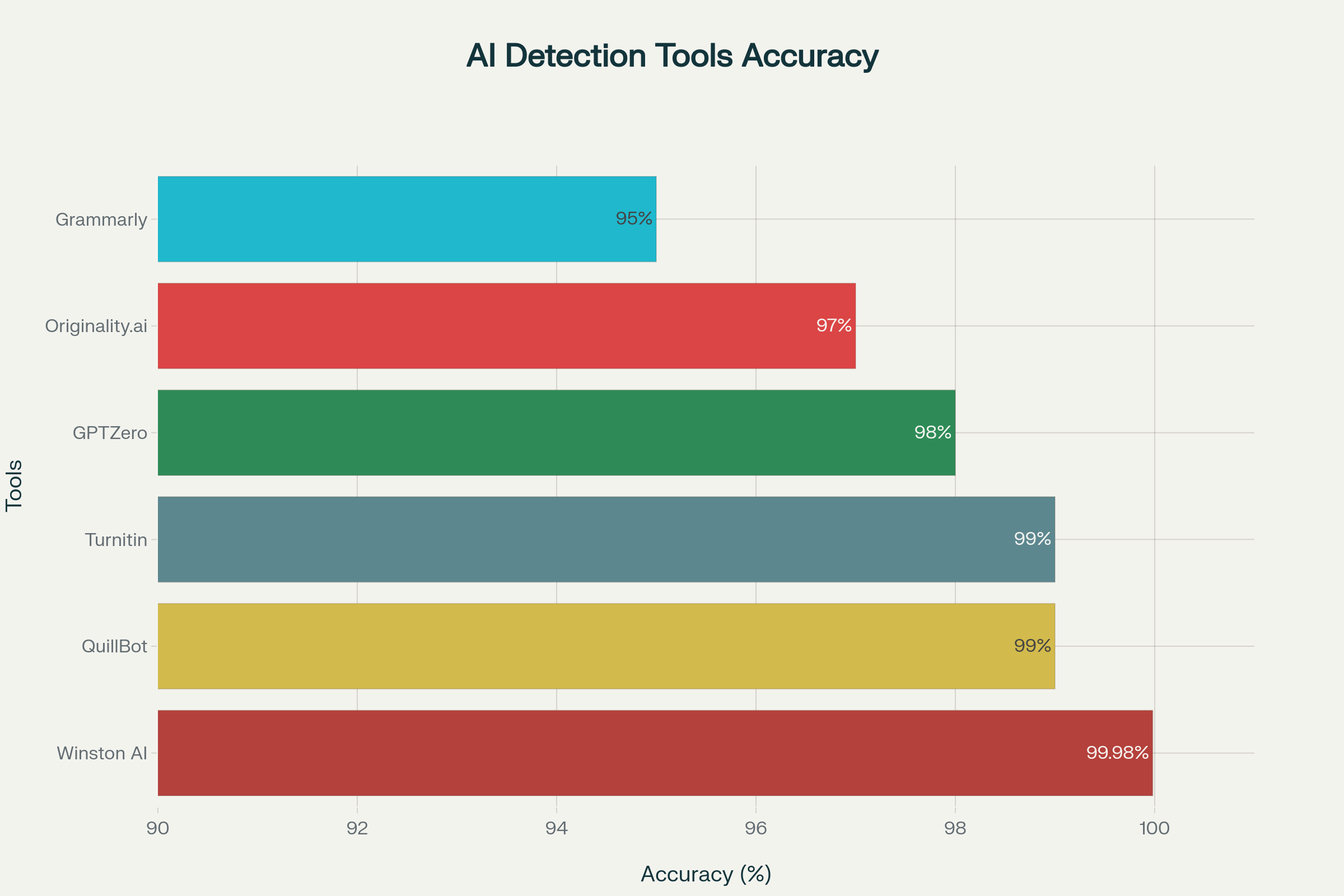
This chart illustrates the relative accuracy of major AI detection platforms based on independent 2025 test results. Winston AI leads with near-perfect detection at 99.98%, followed closely by Turnitin and QuillBot at 99%. GPTZero remains highly reliable for classroom use at 98%, while Originality.ai performs well for publishers at 97%. Grammarly, though designed primarily as a writing assistant, maintains moderate detection accuracy around 95%. Together, these results show that institutional tools like Winston AI and Turnitin currently offer the most robust detection performance for educators.
Turnitin - The Institutional Standard
Think of it as: The big, established security system that most schools already use
Best for: Institutions that want comprehensive plagiarism and AI detection in one system
Key Features:
· Integrates with existing campus systems
· Shows detailed reports highlighting suspected AI content
· Claims 99%+ accuracy on longer documents
Reality Check: Students can’t access it directly, which creates a knowledge gap
GPTZero - The Educator-Friendly Option
Think of it as: The teacher’s personal AI detective tool
Best for: Individual educators who want to check assignments before or after submission
Key Features:
· Free version available for basic checking
· Chrome extension for easy use
· Designed specifically for educational settings
· Students can use it too, promoting transparency
Why It Matters: GPTZero takes a “transparency over punishment” approach, focusing on education rather than enforcement[6]
QuillBot AI Detector - The Multi-Tool
Think of it as: A Swiss Army knife that includes detection among other writing tools
Best for: Educators who want detection plus writing assistance features
Key Features:
· Includes AI detection, plagiarism checking, and humanizing tools
· Sentence-by-sentence breakdown showing which parts might be AI
· Relatively affordable at $4.17/month
Caution: The fact that it includes humanization tools creates ethical complexity
Winston AI - The Academic Specialist
Think of it as: The specialized tool built specifically for educational institutions
Best for: Schools focused on comprehensive academic integrity
Key Features:
· Claims 99.98% accuracy rate
· Includes image detection (for AI-generated visuals)
· Offers certification that content is human-written
Cost Consideration: More expensive at $12/month but includes advanced features
Choosing the Right Tool for Your Classroom
The “best” tool depends on your specific situation:
If you’re an individual teacher wanting to spot-check assignments: GPTZero’s free version is your best starting point. It’s designed for educators and promotes transparency.
If your school wants institution-wide solutions: Turnitin remains the most comprehensive option, despite its limitations.
If you want to help students check their own work: GPTZero again wins because students can access it, promoting self-monitoring.
If you need additional writing tools: QuillBot offers good value, but be aware of the ethical implications of its humanizer features.
Hands-On: Testing and Using AI Detectors
Quick Start Exercise:
Go to GPTZero.me (free, no account required for basic use)
Copy a paragraph from a student assignment you’re curious about
Paste it into the detector and review the results
Try the same text with a different detector for comparison
Understanding Results:
High AI probability (80%+): Likely AI-generated, worth investigating
Medium probability (40-80%): Mixed or uncertain, needs human judgment
Low probability (0-40%): Likely human-written, but false positives are possible
Red Flags to Watch For:
Dramatic differences in writing quality between assignments
Perfect grammar with no voice or personality
Generic examples that don’t relate to your specific course content
Sudden changes in vocabulary or complexity level
III. AI Humanizer Tools: What Students Are Using
Understanding AI Humanizers: The “Other Side”
If AI detectors are the digital bloodhounds, AI humanizers are the tools trying to throw them off the scent. Think of them as sophisticated editing programs designed to make AI-generated text appear more human-like.
How They Work:
1. Synonym Substitution: Replacing common AI word choices with more varied alternatives
2. Sentence Restructuring: Breaking up or combining sentences to create more natural flow
3. Pattern Disruption: Introducing intentional inconsistencies that mimic human writing quirks
4. Style Variation: Adjusting tone, complexity, and rhythm to appear more natural
The August 2025 Game Changer: Most of these tools suddenly became ineffective when Turnitin updated its detection system to specifically identify humanized content. This created a new reality where trying to hide AI use became much more difficult.
Popular Humanizer Tools and Their Effectiveness
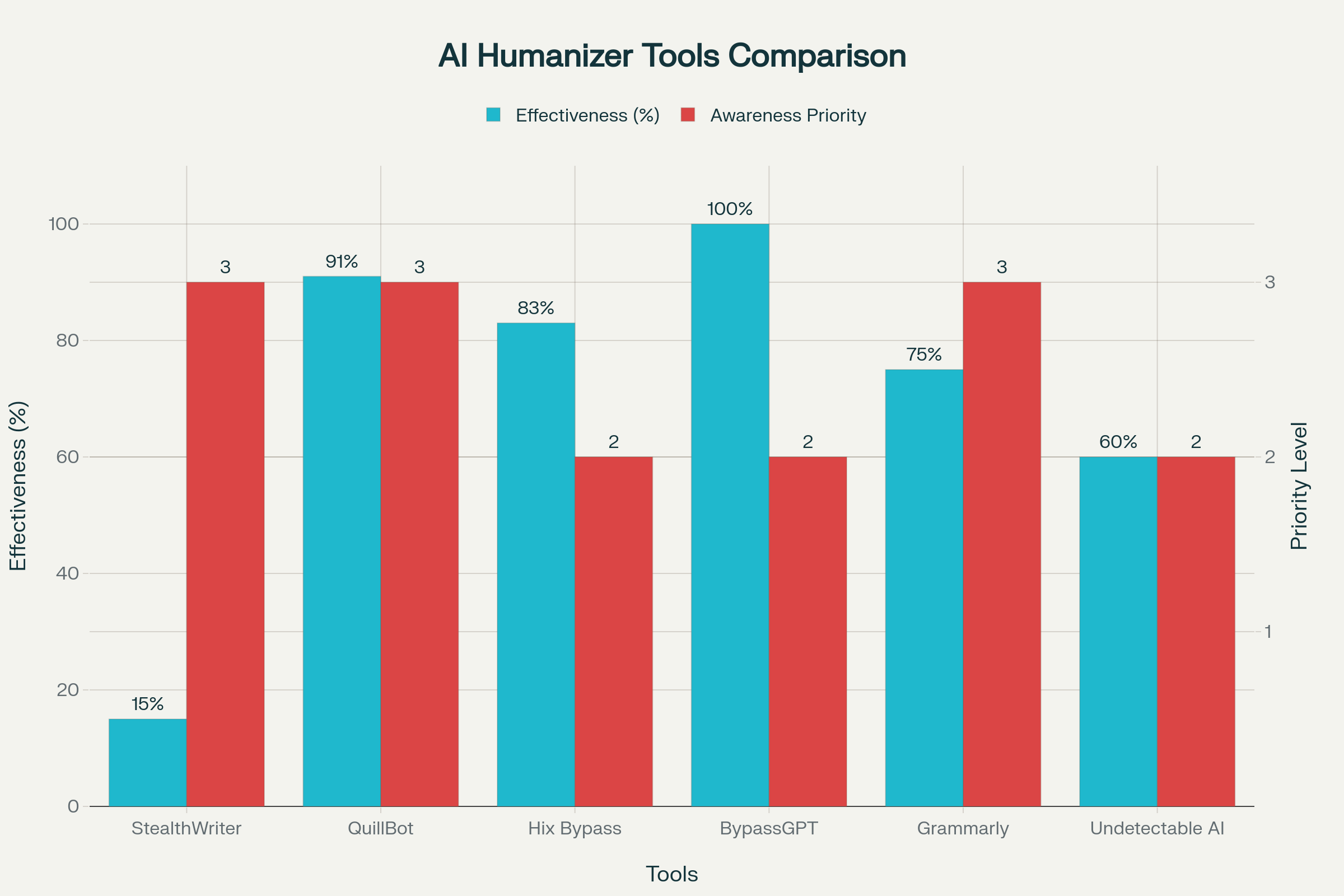
This figure compares the effectiveness of popular AI humanizer tools against modern detection systems and the priority level of educator awareness for each. The chart highlights that while some tools, like StealthWriter, still achieve limited success at reducing AI detection scores, most—including QuillBot, BypassGPT, and Hix Bypass—no longer fool Turnitin or GPTZero following their 2025 updates. See new features of Turn it in.
For non-technical educators, AI humanizers are tools that “rewrite” or “rephrase” AI-generated text to make it appear more human-like in style or tone. They typically rely on natural language processing (NLP)—similar technologies that power tools like chatbots or Grammarly—to change vocabulary patterns, vary sentence rhythm, and remove phrases that sound mechanical. Check out this review for more insides about Humanizers and their applications.
However, recent updates to major detection systems can now recognize these rewrites, meaning most humanized text is still detectable. Tools such as QuillBot and Grammarly remain widely used by students because they’re accessible and integrated into writing workflows, not because they reliably bypass detection. StealthWriter, while more advanced, is subscription-based and less common among students.
The “awareness priority” bars indicate how closely instructors should monitor each tool’s use in class: High-priority tools (QuillBot, Grammarly, StealthWriter) are popular and can influence assignment integrity; medium-priority tools (Hix Bypass, BypassGPT, Undetectable AI) are less effective but often marketed to students online.
In short, this figure helps faculty visualize that while technological misuse still exists, most AI humanizers offer only limited effectiveness today. The bigger challenge is educating students about appropriate AI use rather than simply detecting or penalizing them.
Based on systematic testing conducted in October 2025, here’s what educators need to know about the tools students are using:
QuillBot - The Student Favorite (But No Longer Effective)
Why Students Love It: Easy to use, affordable, and marketed as a “writing assistant”
Current Reality: 91% of humanized text still detected by updated systems
Red Flag for Educators: Very high usage among students who may not realize it’s ineffective
Teaching Moment: Great example of how students may think they’re “safe” when they’re not
StealthWriter - The Only Survivor (For Now)
What It Does: Uses advanced algorithms and multiple refinement levels
Current Effectiveness: Achieves “star percentage” (less than 20% AI detection)
Cost Reality: $35/month puts it out of reach for most students
Educator Insight: If you see dramatically improved writing from a struggling student, this might be the culprit
Hix Bypass and BypassGPT - The Failed Promises
Marketing Claims: Promise to completely bypass AI detection
Reality: 83% and 100% detection rates respectively, making them completely ineffective
Student Impact: Students using these tools are unknowingly submitting easily detectable AI content
Policy Implication: Students may claim they “tried to humanize” their work, not realizing the tools failed
Grammarly’s AI Features - The Legitimate Gray Area
Complexity: Grammarly includes both legitimate writing assistance and humanization features
Challenge for Educators: Students may use it legitimately for grammar checking but unknowingly engage humanization features
Policy Consideration: Most institutions consider basic Grammarly use acceptable, but the AI features complicate this
Warning Signs and Red Flags for Educators
Behavioral Red Flags:
· Students submitting assignments with perfect grammar but lacking personal voice
· Dramatic improvement in writing quality without corresponding improvement in class participation
· Generic examples that don’t connect to course-specific content
· Assignments that feel “too perfect” for the student’s demonstrated abilities
Technical Red Flags:
· Text that passes basic AI detection but feels artificial when read aloud
· Consistent formatting and structure across different assignments
· Vocabulary that’s unusually sophisticated for the student’s typical work
· Perfect transitions and flow that seem unnatural for the student’s writing level
Current State: Why Most Humanizers Are Failing
The August 2025 Turnitin update changed everything. Instead of just detecting AI patterns, modern detection systems now identify the specific modifications that humanizers make. It’s like training a security guard to recognize not just fake IDs, but also the specific techniques used to make fake IDs.
What This Means for Students: Most students using humanizers don’t realize their tools have become ineffective. They may submit work thinking it’s “safe” when it’s actually easily detectable.
What This Means for Educators: You may encounter students who claim they “tried to avoid detection” but still submitted obviously AI-generated work. This creates opportunities for education rather than punishment.
IV. The Academic Integrity Challenge
Beyond Traditional Plagiarism: New Forms of Dishonesty
Traditional plagiarism involved copying someone else’s work and claiming it as your own. AI-generated content creates new categories of academic dishonesty that don’t fit our old frameworks:
AI Laundering: Using AI to generate content, then humanizing it to avoid detection
Prompt Engineering Plagiarism: Copying prompts or strategies to generate AI content
Hybrid Dishonesty: Mixing AI-generated content with original work without disclosure
Tool Stacking: Using multiple AI tools in sequence to create content that’s harder to detect
These new forms require new approaches to education and enforcement.
The False Positive Problem: When Humans Look Like AI
One of the most serious challenges facing educators is the false positive problem. AI detectors sometimes flag human-written work as AI-generated, creating significant ethical and practical problems.
Who Gets False Positives Most Often:
· Non-native English speakers whose writing may seem “too perfect” grammatically
· Students with neurodivergent conditions who write in very structured ways
· Advanced students whose writing is highly polished
· Students writing in formal academic styles that match AI training data
Case Study Example: A university student received a zero on an important assignment because Turnitin flagged their work as 100% AI-generated. Upon investigation, the student had written the entire paper by hand, photographed their handwritten pages, and converted them to text using OCR software. The formal academic language and consistent structure triggered the false positive.[7]
Best Practices for Handling Suspected AI Use:
1. Never rely solely on detector scores - Use them as starting points for investigation, not final evidence
2. Compare to previous work - Look for dramatic changes in writing style, quality, or voice
3. Have conversations with students - Often, direct discussion reveals more than any technology
4. Offer opportunities for clarification - Allow students to explain their writing process
5. Document your process - Keep records of your investigation methods and reasoning
Building Trust in an AI-Saturated World
The goal isn’t to eliminate AI from education—it’s to create environments where AI is used ethically and transparently. This requires building trust between educators and students.
Trust-Building Strategies:
· Transparency about your own AI use: Share how you use AI tools in your work
· Clear, specific policies: Students need to know exactly what’s allowed and what isn’t
· Education over enforcement: Focus on teaching appropriate use rather than catching violations
· Process-oriented assessment: Design assignments that emphasize the learning process, not just final products
Case Studies: Real Classroom Scenarios
Scenario 1: The Improving Student
A typically struggling student submits an essay that’s dramatically better than their previous work. AI detection shows 85% probability of AI generation.
Good Response: Schedule a conference to discuss the student’s writing process. Ask about research methods, revision strategies, and specific word choices. Often, you’ll discover whether legitimate improvement occurred or AI assistance was used.
Poor Response: Immediately assign a zero based solely on the detection score.
Scenario 2: The False Positive
A strong student’s work is flagged as AI-generated, but their writing history suggests this is unlikely.
Good Response: Test the flagged sections with multiple detectors, examine the work for consistency with the student’s voice, and have a conversation about the specific concerns.
Poor Response: Assume the detector is always right and pursue academic misconduct charges.
Scenario 3: The Honest AI User
A student discloses they used ChatGPT to help brainstorm ideas but wrote the essay themselves. Their work shows low AI detection scores.
Good Response: Evaluate based on your stated AI policy. If brainstorming was allowed, focus on the quality of their original analysis and writing.
Poor Response: Penalize any AI use regardless of your stated policies.
V. Professional Development: Building Your AI Literacy
Essential Knowledge Every Educator Needs
The purpose is to move educators from AI awareness to AI fluency and leadership, ensuring they can teach, assess, and lead in environments where artificial intelligence is seamlessly integrated into education.
You don’t need to become an AI expert, but you do need basic literacy in this area. Think of it like digital literacy—you don’t need to be a computer programmer, but you need to understand email, web browsers, and basic technology concepts.
Core Competencies for Educators:
Understanding what AI can and cannot do in writing and research
Recognizing AI-generated content through both technological and human assessment
Creating assignments that promote authentic learning even with AI available
Developing policies that are clear, enforceable, and educationally sound
Teaching students to use AI ethically and effectively
Stage 1: Awareness and Orientation (Weeks 1–2)
Goal: Understand what AI is and why it matters in teaching and learning.
Learning Outcomes:
Recognize what generative AI tools (like ChatGPT, Gemini, and Claude) can and cannot do.
Understand ethical issues in AI use (bias, privacy, source credibility, and academic honesty).
Identify existing institutional AI policies and frameworks.
Professional Learning Options:
Day of AI Webinar Series – 1-hour interactive sessions on AI basics.
Monsha “AI 101 for Teachers” – Free introductory course on practical AI applications.
AIEDU’s “AI Literacy for Educators” – Self-paced modules—ideal for busy faculty.
Deliverable:
Create a reflective journal entry or discussion post summarizing AI’s potential role in your discipline.
Stage 2: Applied Classroom Integration (Weeks 3–6)
Goal: Move from awareness to practical classroom use.
Learning Outcomes:
Experiment with AI lesson design, automated feedback, and formative assessment tools.
Differentiate between ethical and non-ethical student uses of AI humanizers or rewriters.
Learn to use AI detection tools (Turnitin, GPTZero, etc.) as teaching aids—not punishment tools.
Professional Learning Options:
ISTE’s “AI Deep Dive for Educators” – Implementation-focused course with certification.
TeachAI Practical Guide – Ethical AI integration in curriculum and instruction.
Castleton University’s “AI in Education: Transforming Teaching and Leadership” workshop.
Deliverable:
Submit or present one AI-supported lesson plan or rubric demonstrating enhanced learning outcomes.
Stage 3: Pedagogical Innovation & AI Ethics (Weeks 7–10)
Goal: Build responsible AI integration models that protect academic integrity.
Learning Outcomes:
Develop clear AI-use disclosure policies for students.
Redesign assessments to encourage transparency and authenticity.
Learn strategies to reduce false positives in AI detection.
Professional Learning Options:
UNESCO AI Competency Framework Training – Focus on ethics, inclusivity, and teacher agency.
Stanford Teaching Commons: “Understanding AI Literacy” – Pedagogical strategies for responsible AI use.
Participate in faculty-led “AI Ethics Roundtables” or discussion groups.
Deliverable:
Create or revise your course AI policy and share it in your department or faculty workshop.
Stage 4: Institutional Leadership & Community Building (Weeks 11–16)
Goal: Lead and advocate for AI literacy development at institutional level.
Learning Outcomes:
Align institutional goals with ethical AI policy.
Lead workshops or mentorship sessions for colleagues.
Integrate AI ethics and digital literacy into professional development programs.
Professional Learning Options:
ISTE GenerationAI Leadership Series – For deans, chairs, and administrators fostering AI integration.
AIEDU Professional Learning Communities – Networked mentorship and curriculum co-creation.
Educause “Teaching with AI” Conferences and Evidence-Based Practice Exchange.
Deliverable:
Develop and present an AI Literacy Action Plan for your department, including faculty training and student policy recommendations.
Stage 5: Continuous Innovation and Research (Ongoing)
Goal: Contribute to shaping AI’s future in education.
Learning Outcomes:
Conduct or participate in classroom research on AI use and impact.
Publish or present case studies of AI-enhanced pedagogy.
Mentor early-career faculty and contribute to national/international AI literacy initiatives.
Professional Learning Options:
Join AI Literacy Framework Collaboratives (AILit or Digital Education Council).
Attend flagship conferences (EDUCAUSE, ISTE, or AI and the Future of Education Summit).
Key Takeaways
AI Professional Growth Is Iterative: Like digital literacy before it, AI competence develops through experimentation, reflection, and ongoing learning.
Ethics and Agency Come First: Every AI application in the classroom should model transparency, critical evaluation, and human oversight.
Faculty Empowerment Is Essential: Sustained institutional investment—not one-time training—builds true AI confidence among educators.
This improved pathway emphasizes continuous professional growth, ethical alignment, and institutional capacity building, making it a more practical and scalable model than one-time workshops or certificate programs. It transforms AI literacy from a compliance activity into a cultural shift in scholarship, teaching, and leadership.
Free and Paid Training Resources
The good news is that excellent professional development resources are available, many at no cost. Here are the top recommendations:
Free Resources:
Google’s “Generative AI for Educators” (Recommended Starting Point)
· Time Commitment: 2 hours, self-paced
· What You’ll Learn: Basic AI concepts, practical classroom applications, ethical considerations
· Why It’s Good: Created specifically for educators by AI experts
· Certificate: Yes, acceptable for professional development credit in most districts
· Access: grow.google/ai-for-educators/[8]
Microsoft’s “AI for Educators” Learning Path
· Time Commitment: 4 modules, approximately 4 hours total
· Focus: Integration with Microsoft tools (Word, PowerPoint, Teams)
· Practical Value: High, especially if your school uses Microsoft products
· Access: Microsoft Learn platform[9]
Panorama’s “AI Literacy Essentials for K-12”
· Time Commitment: 90 minutes, self-paced
· Unique Feature: Created by educators, for educators
· Focus: Practical classroom applications and safety considerations
· Certificate: Professional development certification included[3]
Paid Professional Development:
ISTE AI Deep Dive for Educators
Investment: Varies by format (online vs. in-person)
Depth: Comprehensive introduction through advanced implementation
Reputation: ISTE is the gold standard for educational technology training
Best For: Educators who want to become AI leaders in their schools
Columbia Teachers College “AI Literacy for Educators”
Format: 2-week intensive course
Academic Rigor: University-level curriculum design
Best For: Educators seeking deep understanding and academic credentials
Flint K-12 AI Literacy Course
Unique Approach: Three levels from foundational to advanced
Practical Focus: Hands-on experience with actual AI tools
Certification: Available for each level completed
Creating Your Personal Learning Plan
Phase 1: Foundation Building (1-2 weeks)
Take Google’s free AI for Educators course
Experiment with ChatGPT or similar tools for personal tasks
Test at least two AI detectors with sample text
Phase 2: Classroom Application (1 month)
Develop your first AI policy for assignments
Try using AI for lesson planning or administrative tasks
Create one AI-resistant assignment for your subject area
Phase 3: Advanced Implementation (2-3 months)
Attend a more comprehensive training program
Lead discussions with colleagues about AI integration
Develop assessment strategies that work with AI availability
Phase 4: Leadership and Advocacy (Ongoing)
Participate in institutional AI policy development
Mentor other educators in AI literacy
Stay current with emerging tools and trends
Leading Change @ Southern
Many educators find themselves becoming the “AI person” in their school once they develop basic competency. This can be an opportunity to lead positive change.

Starting Small:
Share what you learn with immediate colleagues
Offer to pilot AI policies in your own classes
Document successes and challenges for others to learn from
Building Support:
Focus on how AI can reduce teacher workload rather than just student concerns
Emphasize practical benefits before addressing complex ethical issues
Create simple resources (cheat sheets, quick guides) for colleagues
Institutional Leadership:
Volunteer for AI policy committees
Propose professional development sessions for your school
Connect with other schools facing similar challenges
Avoiding Common Mistakes:
Don’t become the “AI police” who only focuses on detection and enforcement
Avoid overwhelming colleagues with too much information at once
Remember that resistance often comes from fear, not hostility
VI. Practical Implementation Strategies
Developing AI Policies That Work
A good AI policy is like a good classroom management plan—clear, enforceable, and focused on learning outcomes rather than punishment. Many early AI policies failed because they were either too restrictive or too vague.
Key Elements of Effective AI Policies:
1. Clear Definitions
Don’t assume students understand what you mean by “AI assistance.” Define specific tools and uses.
Example: “AI assistance includes but is not limited to: ChatGPT, Claude, Google Bard, Grammarly’s AI features, and any tool that generates text, ideas, or analysis based on prompts.”
2. Specific Permissions and Prohibitions
Avoid gray areas that lead to confusion and conflict.
Good: “You may use AI tools for initial brainstorming and idea generation, but all analysis, arguments, and conclusions must be your own original thinking.”
Poor: “Limited AI use is acceptable for this assignment.”
3. Disclosure Requirements
Make it easy for students to be transparent about their AI use.
Example: “If you use any AI tools for this assignment, include a brief note at the end describing which tools you used and how you used them.”
4. Consequences That Match Violations
Different levels of AI misuse should have different consequences.
Minor Violation: Using AI for brainstorming without disclosure → opportunity to revise with proper attribution
Major Violation: Submitting AI-generated work as original → assignment redo or grade reduction
Severe Violation: Using AI to bypass learning objectives completely → academic misconduct process
Student Education and Transparency
The most effective approach to AI in education is teaching students to use it ethically rather than trying to prevent all use.
Essential Student Education Topics:
Understanding AI Capabilities and Limitations
Students need to know that AI can generate plausible-sounding content that may be factually incorrect
Teach them to verify AI-generated information through reliable sources
Help them understand that AI lacks original insight and critical thinking
Ethical Use Principles
Academic integrity applies to AI use just as it does to human sources
The goal of assignments is learning, not just producing correct answers
Using AI to bypass learning objectives undermines their education
Practical Skills
How to craft effective prompts for legitimate uses
When AI assistance is appropriate versus when original thinking is required
How to properly attribute AI assistance in their work
Transparency Benefits
Being honest about AI use protects them from false accusations
Transparency allows for feedback on appropriate AI integration
Ethical behavior builds trust with instructors
Assessment Design in the AI Era
Traditional assessment methods often become problematic when AI tools are readily available. The solution isn’t to eliminate all assessments, but to design assignments that promote authentic learning.
AI-Resistant Assignment Strategies:
Process-Focused Assignments
Instead of just evaluating final products, build assessment around the learning process.
Example: Require students to submit draft outlines, research notes, and revision logs along with final papers.
Personal Connection Requirements
Design assignments that require students to connect course material to their personal experiences, local contexts, or specific course discussions.
Example: “Analyze how the themes in this novel relate to a challenge you’ve personally observed in your community.”
Real-Time Performance Tasks
Include components that must be completed in class or during live sessions.
Example: Students prepare research at home but present and defend their analysis during class discussion.
Scaffolded Learning Sequences
Break complex assignments into multiple stages where each stage builds on previous work and class discussions.
Example: Week 1 - Choose research question; Week 2 - Submit annotated bibliography; Week 3 - Present preliminary findings to class; Week 4 - Submit final analysis incorporating peer feedback.
Building Ethical AI Use Culture
The ultimate goal is creating a classroom environment where students choose to use AI ethically because they understand its educational value, not because they fear getting caught.
Cultural Strategies:
Model Ethical AI Use
Share how you use AI tools in your own work, including both successes and limitations you’ve encountered.
Emphasize Learning Over Performance
Regularly remind students that the goal of assignments is developing their thinking skills, not just producing correct answers.
Celebrate Transparency
When students disclose AI use appropriately, acknowledge their honesty rather than just focusing on the potential problems.
Provide Legitimate AI Integration Opportunities
Give students chances to use AI tools appropriately for learning, reducing the temptation to use them inappropriately.
Create Peer Accountability
Encourage students to discuss AI use with each other, building community standards around ethical behavior.
VII. Looking Forward: The Future of AI in Education
Emerging Trends and Technologies
The AI landscape in education continues to evolve rapidly. Understanding emerging trends helps educators prepare for continued change rather than constantly playing catch-up.
Significant Developments on the Horizon:
Multimodal AI Detection
Future detection systems will analyze not just text, but images, audio, and video content. This expansion addresses the growing use of AI for creating visual presentations, generating charts and graphs, and even producing video content.
Blockchain Verification Systems
Some institutions are exploring blockchain-based systems for verifying content authenticity. These approaches focus on proving provenance (where content came from) rather than detecting AI patterns after the fact.
Integrated Learning Management Systems
AI tools are increasingly being built directly into learning management systems, making the line between “using AI” and “using educational technology” increasingly blurred.
Personalized AI Tutoring
AI systems designed specifically for education are becoming more sophisticated, potentially providing legitimate one-on-one tutoring support that complements rather than replaces human instruction.
Preparing for Continuous Change
The pace of AI development means that specific tools and techniques will continue to evolve. The most important preparation is developing adaptable approaches rather than fixed responses to current technology.
Future-Ready Strategies:
Focus on Principles Over Specific Rules
Develop policies based on educational principles (promoting learning, maintaining integrity, encouraging growth) rather than rules about specific tools.
Build Adaptive Assessment Practices
Create assessment approaches that can evolve with new technology rather than trying to create “AI-proof” assignments.
Maintain Learning Mindset
Plan for ongoing professional development as a permanent part of your teaching practice, not a one-time response to current changes.
Cultivate Student Partnership
Work with students as partners in navigating AI integration rather than adversaries in an enforcement battle.
Resources for Ongoing Learning
Professional Organizations with AI Focus:
ISTE (International Society for Technology in Education): Regular conferences and resources on AI in education
EDUCAUSE: Higher education technology organization with extensive AI resources
GenerationAI: Coalition focused specifically on K-12 AI integration
Recommended Publications and Websites:
EdTech Hub: Research-based insights on educational technology trends
AI for Education: Practical resources and tools for classroom integration
MIT’s Teaching Systems Lab: Academic research on AI and learning
Online Communities:
Facebook Groups: “AI for Teachers,” “Educational Technology”
Reddit: r/Teachers, r/EducationalTechnology
Twitter/X: Follow hashtags #AIinEducation, #EdTech, #TeacherLife
Conclusion: Moving Forward with Confidence